
During badge access, for federal document access please call AskUS at 1-303-315-7763

Skip to main content
Auraria Library logo
  • My Bookshelf
  • Ask Us
  • Tell Us
  • Give
  • Quick Menu

Find Resources

  • Databases List
  • Google Scholar
  • Journal List
  • New Material List
  • Prospector
  • Search Course Reserves
  • Special and Digital Collections
  • Start My Research
  • Worldcat

Library Services

  • Accessibility Services
  • Book Study Rooms
  • Borrow and Return
  • Borrow from Other Libraries
  • Computing
  • Faculty Services
  • Grab-to-Go
  • Instruction Services
  • Interlibrary Loan (ILLiad)
  • Library Anywhere
  • Open Educational Resources
  • Recommend a Purchase
  • Request for Tabling
  • Renew Online (My Bookshelf)

About

  • About the Library
  • Collection Development
  • Diversity & Inclusion
  • Interactive Floor Maps
  • Jobs @ Library
  • Map & Directions
  • Library Hours
  • Policies & Guidelines
  • Privacy Statement
  • Staff Directory

Research Help

  • Ask Us
  • Citation Builder
  • Library Tutorials
  • Research FAQ
  • Research Guides
  • Schedule a Research Consultation

Study Spaces

  • Study Rooms
  • The Library Café
  • North & South Courtyards
  • Deep Quiet Study
  • Study Alcoves

Learning Spaces

  • Classrooms
  • Digital Media Studio
  • Innovation Garage

Technology

  • Ask Us Collection
  • Computer Labs
  • Print and Scan
  • Remote Access Help
  • Wireless Access

In the Know

  • Discover New Books
  • Faculty Authors
  • Staff Picks
  • What We're Reading
  • News|Events
My Bookshelf
Ask Us
Tell Us
Give
  • Find Resources
    • Databases List
    • Google Scholar
    • Journal List
    • New Material List
    • Prospector
    • Search Course Reserves
    • Special and Digital Collections
    • Start My Research
    • Worldcat
  • Library Services
    • Accessibility Services
    • Book Study Rooms
    • Borrow and Return
    • Borrow from Other Libraries
    • Computing
    • Faculty Services
    • Grab-to-Go
    • Instruction Services
    • Interlibrary Loan (ILLiad)
    • Library Anywhere
    • Open Educational Resources
    • Recommend a Purchase
    • Request for Tabling
    • Renew Online (My Bookshelf)
  • About
    • About the Library
    • Collection Development
    • Diversity & Inclusion
    • Interactive Floor Maps
    • Jobs @ Library
    • Map & Directions
    • Library Hours
    • Policies & Guidelines
    • Privacy Statement
    • Staff Directory
  • Research Help
    • Citation Builder
    • Library Tutorials
    • Research FAQ
    • Research Guides
    • Schedule a Research Consultation
  • Study Spaces
    • Study Rooms
    • The Library Café
    • North & South Courtyards
    • Deep Quiet Study
    • Study Alcoves
  • Learning Spaces
    • Classrooms
    • Digital Media Studio
    • Innovation Garage
  • Technology
    • Ask Us Collection
    • Computer Labs
    • Print and Scan
    • Remote Access Help
    • Wireless Access
  • In the Know
    • Discover New Books
    • Faculty Authors
    • Staff Picks
    • What We're Reading
    • News|Events
Close Menu
Auraria Library red logo
library book stacks

Self-Guided Library Tours

Self-Guided Library Tours

Breadcrumb

  • Home
  • instruction services
  • Current: Self-Guided Library Tours

Do you want to introduce your students to Auraria Library? Here are several activities you can use to familiarize your students with the library and its services.

In-Person Self-Guided Tour

Our in-person, self-guided tour is an interactive activity for students to explore the library on their own or in groups. This activity can be assigned during class time or for homework. It introduces students to the library’s space and services both in-person and online.

If you would like the answer key to help facilitate your discussion of the in-person tour, please email Instruction Services to request it.

Online Self-Guided Tour

This online self-guided tour introduces students to the library’s online presence and services. This is a great assignment for online students who will not have the opportunity to use the library in-person.

The online tour is self-grading and provides immediate feedback on students’ responses. Students can provide an email address at the end of the tour to receive a copy of their responses.

Introduction to Research

The introduction to research activity can be used on its own or as an addition to the in-person self-guided tour. It offers an opportunity for students to start exploring and comparing research tools.

This discussion guide offers suggestions and questions to review students’ answers and prompt discussion.
Instruction Services Quick Links

  • Instruction Services Overview
  • Information Literacy & Instruction Requests
  • Schedule Instruction Session
  • Self-Guided Library Tours
  • Asynchronous Online Instruction
  • OER
  • Meet the Teaching Team
  • Consult With Us

Auraria Library


Auraria Library Home

Support the Library


About Federal Depository Library A Federal Depository Library

Contact Us


Google maps directions

1100 Lawrence Street
Denver, CO 80204

303-315-7763

Maps and Directions

? Ask Us Tell Us

Connect


Follow Us:

Sign up for our Library Newsletter


© Auraria Library Skyline Catalog |


University of Colorado Denver
Metropolitan State University of Denver
Community College of Denver
Auraria Higher Education Center

Ask Us Chat

Use this chat box to ask a librarian for research help. We’re available 24/7! (Holidays excluded.)

Text

Text us your questions to 720-438-4446. We’ll answer from 9 am to 6 pm during the week and reply to after hours questions the next morning. (Your provider rates will apply.)

In-Person

  • Visit the Ask Us Desk
    The Ask Us Service Desk is located on the first floor of the Library and provides in-person help by answering questions about the Library, Campus, or three Institutions. This service also loans anatomical items, technology items (such as phone charges and calculators), plus course reserves, or textbooks, for some classes.

  • Research Consultations
    Research consultations are for in-depth and lengthy discussions about research questions. Please use Schedule a Research Consultation Form to request an appointment. We can help you out via Zoom or over the phone. Due to the level of preparation needed, appointments should be made 48 hours in advance. If you need immediate help, please use our 24/7 chat service.

Call

For general library information, as well as for questions about borrowing, renewing, or returning library materials, call 303-315-7763.

  • Friendly Man with a checklist

    Let's get started with using the library tools!

    Take a quick tour to learn about the research tools on this page.

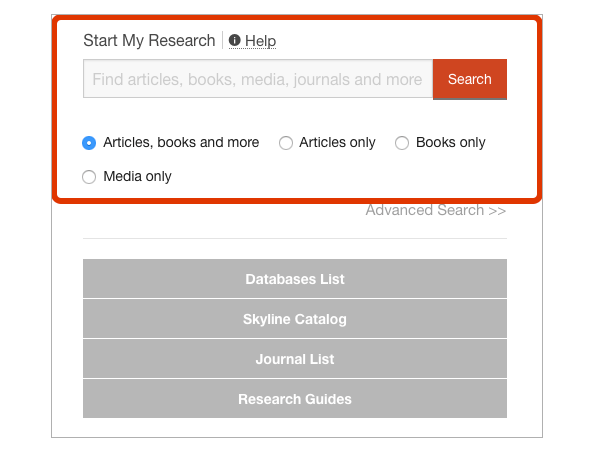
  • Start My Research

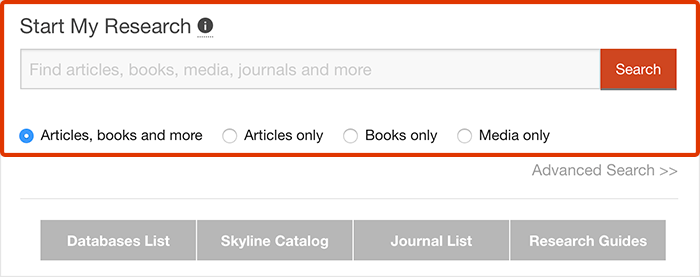
    This is a quick search option for finding research materials. Enter your search terms to find books, articles, media and more.

    Start My Research highlighted on the homepage Start My Research highlighted on the homepage
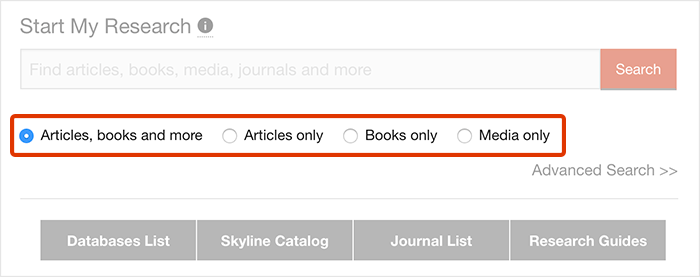
  • Limit Your Search

    You can limit the search to narrow down your results. For example, limit to “Books Only” to find books and ebooks, or “Media Only” for streaming videos.

    Start My Research search filters Start My Research search filters
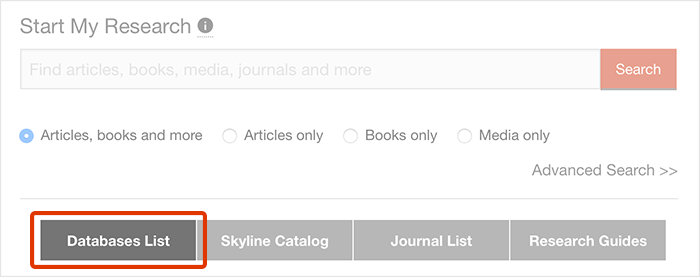
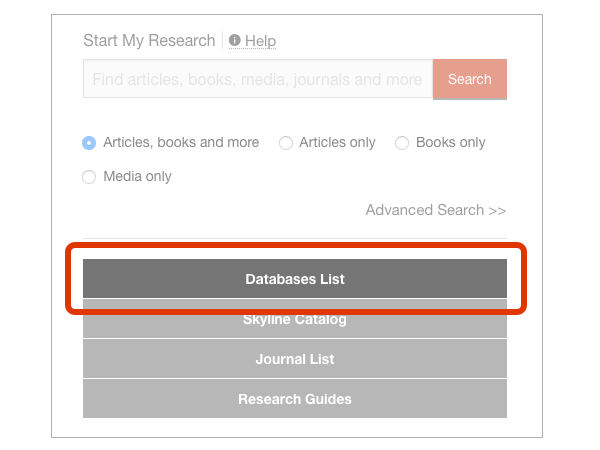
  • Research Tools

    Research menu gives you options for in-depth research. Go to Databases List to find the library's subject or format-specific databases for your research.

    Database List Button Database List Button
  • Get More Help

    Do you still have questions or need help with your research? Check out the Research FAQ or use several options to get in touch with us.


    Ways to contact Ask Us: chat, text, email, in-person, phone
     

    For more ways to get help go to Ask Us.